

Cara ubah nama dan password WIFI Router GGCLINK

Pada tahap awal sambungkan perangkat hp atau laptop anda ke wifi. Untuk mengubah nama wifi dan password, anda hanya perlu membuka browser. Seperti contohnya chrome, mozila ataupun internet explore.
Kemudian ketik alamat url dengan angka berikut 192.168.1.1, maka akan ditampilkan halaman seperti diatas. Masukan username dan password berikut.
username : useradmin,
password : useradmin
Berikut ini halaman setelah login.

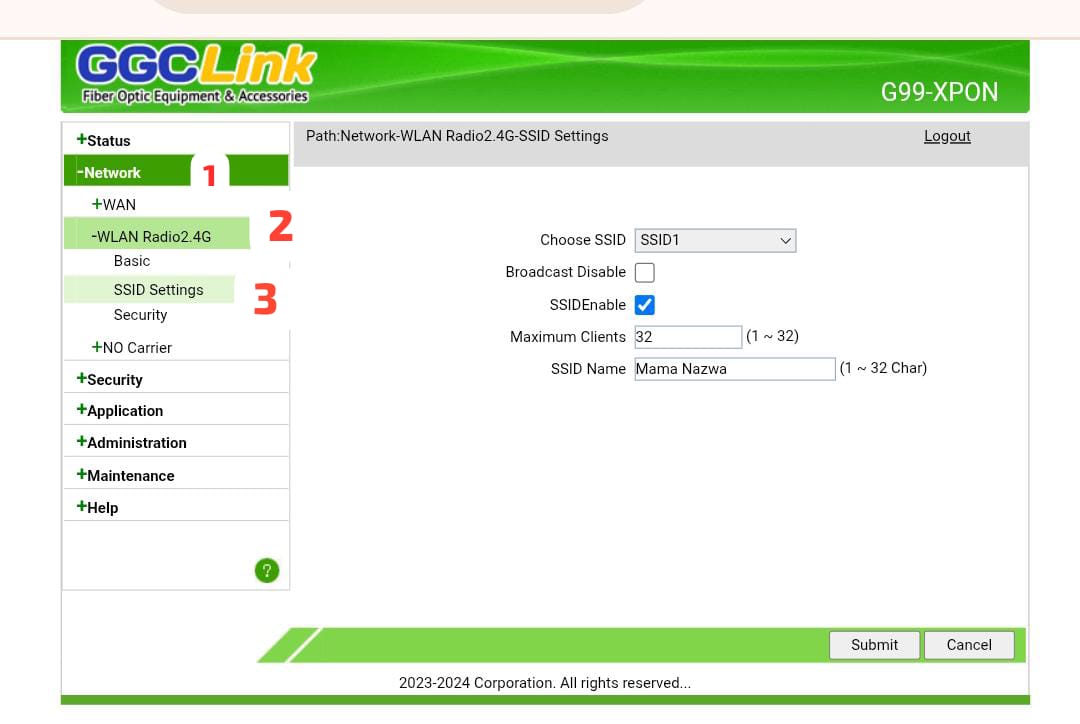
Untuk merubah nama wifi
- Klik network
- Klik wlan radio 2.4G
- Klik ssid settings
- Akan muncul panel sebelah kanan, ubah nama wifi pada kolom ssid name
- Untuk ubah pass, klik security dibawah ssid settings
- isi password 8 digit karakter, terakhir klik Submit.
pada perangkat hp atau laptop akan otomatis terputus, silahkan sambungkan ulang dengan wifi dan password yang baru


One response to “Cara ubah nama dan password WIFI Router GGC LINK”
Hi, this is a comment.
To get started with moderating, editing, and deleting comments, please visit the Comments screen in the dashboard.
Commenter avatars come from Gravatar.