-
Cara ubah nama dan password WIFI Router GGC LINK
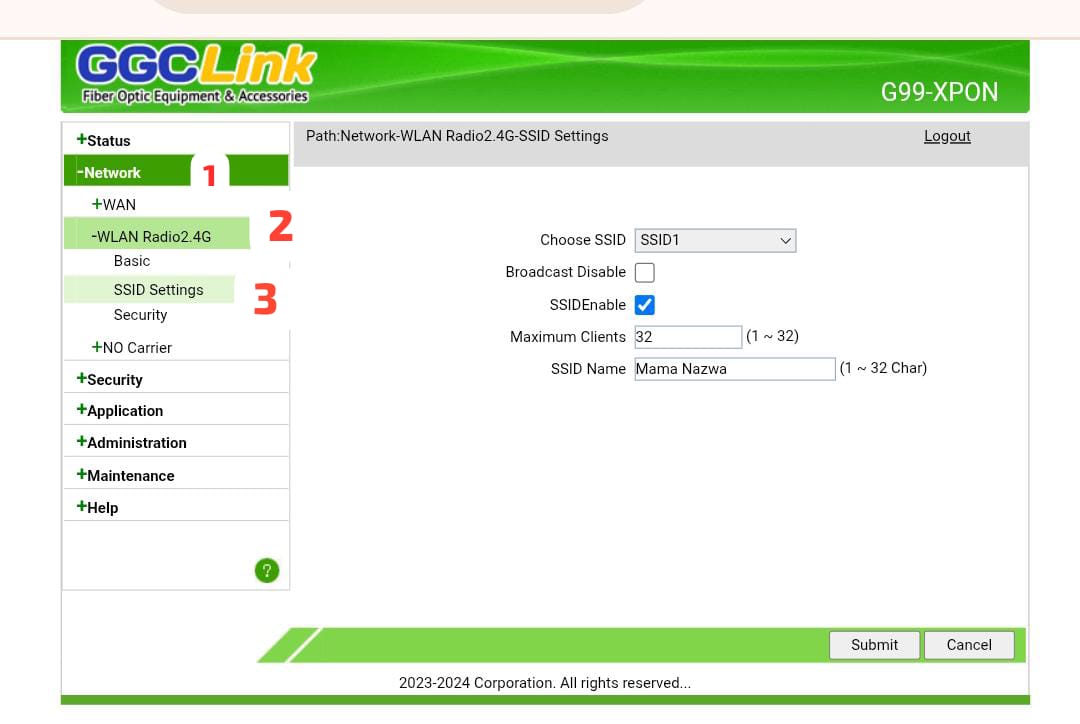
Cara ubah nama dan password WIFI Router GGCLINK Pada tahap awal sambungkan perangkat hp atau laptop anda ke wifi. Untuk mengubah nama wifi dan password, anda hanya perlu membuka browser. Seperti contohnya chrome, mozila ataupun internet explore. Kemudian ketik alamat url dengan angka berikut 192.168.1.1, maka akan ditampilkan halaman seperti diatas. Masukan username dan password…
Search
About
Lorem Ipsum has been the industrys standard dummy text ever since the 1500s, when an unknown prmontserrat took a galley of type and scrambled it to make a type specimen book.
Lorem Ipsum has been the industrys standard dummy text ever since the 1500s, when an unknown prmontserrat took a galley of type and scrambled it to make a type specimen book. It has survived not only five centuries, but also the leap into electronic typesetting, remaining essentially unchanged.
Archive
Categories
Recent Posts
Tags
Gallery